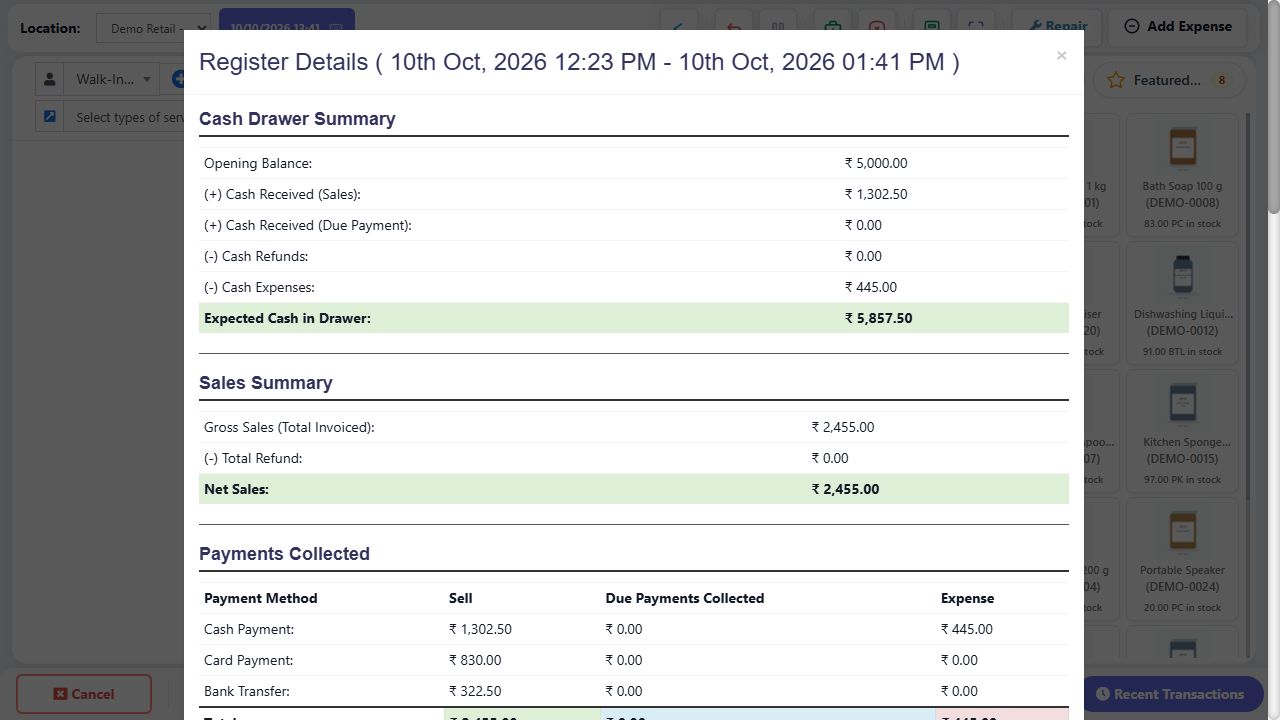
The register is the cashier’s shift record. Opening cash is the float; cash sales and due collections add cash; cash refunds/expenses subtract it. Total sales include non-cash and unpaid trading, so they are not the expected drawer amount. Physical count is recorded at close and compared with expected cash. Use the detailed report sections to explain differences before closing.
SCREEN GUIDE Cash registers — module overview. Select the screenshot to enlarge; optional fields may differ in your business.
Field reference
Use this while completing the form. A required field is marked with *; conditional fields appear only when enabled.
Field / control
What to enter or understand
Opened / Closed / cashier / location
Which shift, person, outlet and period the figures refer to.
Opening balance
Actual float at shift start, not the day’s sales target.
Cash received: sales / due payments
New sale payments versus collections on existing debts.
Cash refunds / expenses
Money leaving the drawer through recorded refund/expense flows.
Expected cash in drawer
Calculated cash balance for the register scope.
Gross sales / refunds / net sales
Sales activity; does not equal cash collected when non-cash/credit exists.
Payments collected by method
Separate sale collections, dues and expenses where shown. Custom method codes need their configured display labels.
Outstanding receivables
Money still owed on the report’s invoices; separate from physical cash.
Products / brands / service summaries
Quantity/value breakdown of activity; rounding can explain differences from rounded invoice totals.
Denomination / count / counted total
Value of a note/coin, number counted, and their product. Count is a whole number, not a cash amount.
Closing note / discrepancy
Explanation for a verified difference between expected and actual cash.
Where to go POS → Close Register / native Cash register → Close shift
Before you start Synchronize pending offline sales first and finish all counter work.
Steps
Count notes and coins physically. Where denomination fields are enabled, enter the count for each value and compare the calculated total to counted cash.
Open Close Register/Close shift and review the expected amount, actual closing amount and other requested payment totals.
Explain any difference in the closing note. Ask the manager about discrepancies instead of changing invoices just to balance the drawer.
Confirm close, then check the closed-register report. Start a new register only for the next shift and its actual opening float.
Check the result The shift is closed with a traceable count and reconciliation.
Before you start Finish synchronization and review the same shift scope.
Steps
Read opening cash, cash sales, due collections, refunds and expenses. Calculate the expected drawer from those cash movements.
Compare payments by method to terminal/UPI records. Do not add non-cash collections to your drawer count.
Review customer dues separately. An unpaid invoice increases sales/receivables, not received cash.
Count notes/coins and enter counts in the denomination fields. Compare actual total to expected and recount if needed.
Investigate missing expense/refund/payment records and preserve their references. Enter a truthful closing note for any unresolved authorised discrepancy.
Close only when the shift is ready and then check its closed status/report.
Check the result The shift closes with an explainable count rather than a forced expected amount.
IN PRACTICE
A practical example
Opening float 500 + cash sales 1,200 + old dues collected 100 − cash refund 50 − cash expense 150 = expected drawer 1,600. A separate card sale of 800 increases sales/collections, but not this cash drawer calculation.
Common questions
Why are sales higher than cash in drawer?
Sales can be paid by card/UPI or remain unpaid; opening float and cash expenses also affect the drawer.
Can I close with queued offline sales?
Synchronize and resolve them first so confirmed server sales/register totals reflect the shift.