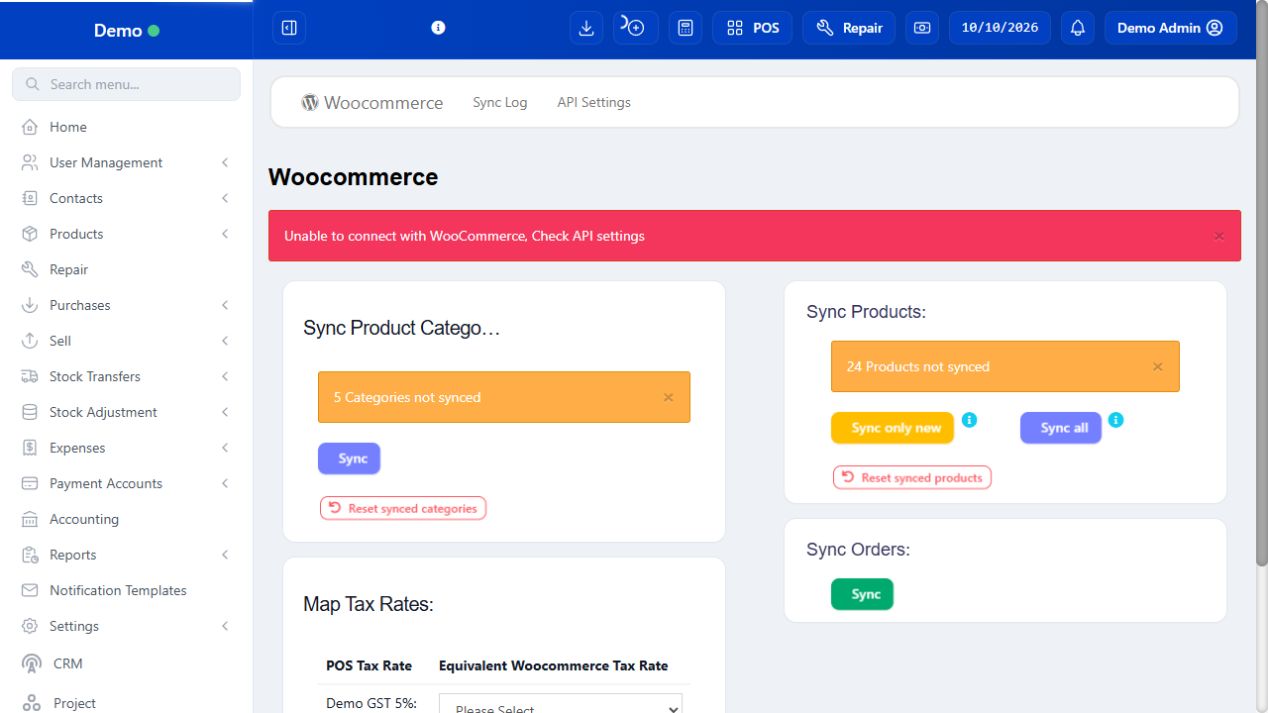
WooCommerce integration connects a configured external shop to Compact. Review product/variation/pricing mappings, sync direction and order references before routine use. A successful connection is not proof every product or order was imported correctly. Keep credentials administrator-managed and test a small approved scope first. Notification Templates and Connector are documented in their own modules.
SCREEN GUIDE WooCommerce — module overview. Select the screenshot to enlarge; optional fields may differ in your business.
Field reference
Use this while completing the form. A required field is marked with *; conditional fields appear only when enabled.
Field / control
What to enter or understand
WooCommerce URL / authorised connection
Intended shop and administrator-maintained credentials. Do not expose secrets in screenshots or guide examples.
Product sync fields / categories / exclusions
Which catalogue data goes to the connected shop; Disable WooCommerce Sync can exclude a product.
Order import / sync log
Which external orders were received and their mapped records; check before importing again.
Notification event / subject / body / placeholders
When and what a message says. Verify actual substitution and recipient on an approved test.
Connector client / redirect / authorisation
Approved app identity and login return path. Native sign-in uses public-client PKCE, not an embedded customer secret.
Before you start Use a connected test shop or an approved production sync scope.
Steps
Read the configured shop and selected sync type before triggering product/order synchronization.
Review its result/log and search the resulting product/order reference in Compact.
Check variation, prices, tax and location mapping with a small approved sample.
If an order already exists, investigate its linked reference/status rather than importing it again blindly.
For rejected mappings or connection failures, ask the integration administrator with the sanitized result and time. Do not paste connection keys into public support screenshots.
Check the result The external and Compact records can be matched without duplicate entry.
IN PRACTICE
A practical example
A synchronized WooCommerce order already linked to a Compact invoice must be investigated by its external reference before retrying import. Creating a second ordinary POS sale for it can duplicate billing and stock consumption.
Common questions
Is WooCommerce connected in the sample Demo?
The demonstration data does not prove an active external store connection. Use your administrator’s actual configured shop.
Should a cashier enter an API client secret?
The native public-client login does not embed a client secret. Use the supplied approved connection settings.